
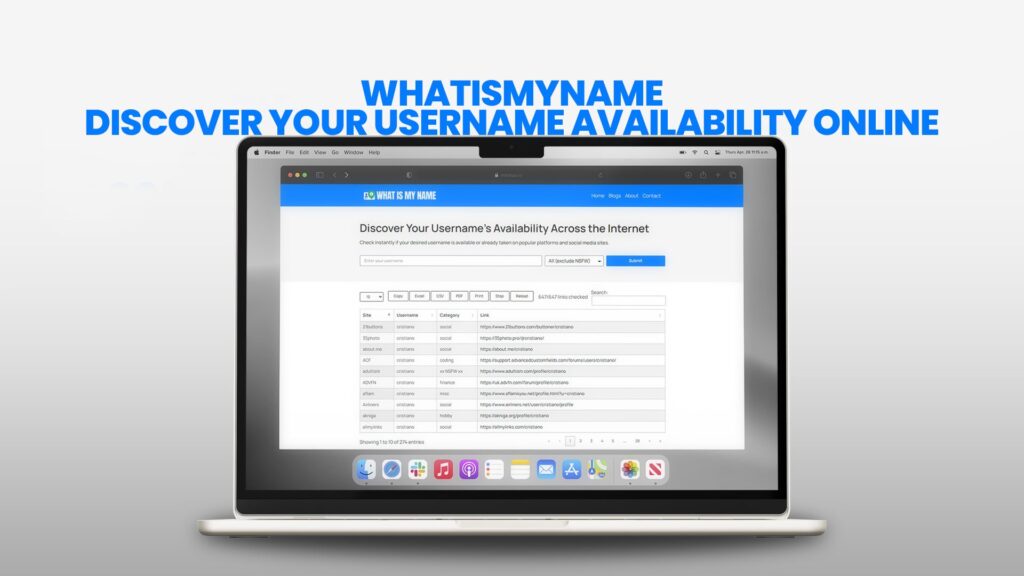
Imagine you are ready to start something new online. Maybe you want to launch a YouTube channel about cooking, create a professional profile for your freelance work, or set up a gaming stream. You have thought of the perfect name. It sounds just right—it represents you, it’s memorable, and it feels unique. You are excited. You go to your first chosen platform, maybe Instagram, and try to sign up. You type in your perfect name with confidence. Then, your excitement crashes. A small red message appears: “This username is not available.” It’s already taken. So, you try another idea. Also taken. And another. Also taken. This process is frustrating and can completely stall your plans before you even begin.
Now, imagine a different way. Imagine typing that perfect name into one single box and, within seconds, seeing a clear list that shows you exactly where that name is free and where it is already in use. You can see its status on Facebook, TikTok, Twitter, Spotify, Xbox, PlayStation, and hundreds of other websites all at once. This is not just a convenient tool—it’s a game-changer for anyone who wants to establish a presence online. This is exactly what WhatIsMyName offers. It is a free, powerful online tool designed to remove the guesswork and manual labor from securing your digital identity. This detailed guide will walk you through everything you need to know about WhatIsMyName, why your username matters more than you might think, and how to use this tool to make smart, informed decisions about your name across the vast internet.
Understanding Your Digital Identity: The Power of a Username
Before we explore the tool, let’s understand what we are dealing with. Your username is far more than just a login credential. In today’s digital world, it is your primary identifier. It is how you present yourself to communities, to audiences, and to the world.
Think of it like this: In the physical world, you have a name, a face, and a voice. Online, especially in text-based or profile-driven spaces, your username is your name, your face, and your voice, all rolled into one. It is the first impression you make. On social media platforms like Instagram and TikTok, your username (or “handle”) is your address. It’s how people tag you, mention you, and find you. In online gaming worlds, your gamertag or in-game name is your reputation. It’s what other players see when you win, lose, or work together as a team. For a business or a creator, your username is a core piece of your brand identity, as important as a logo.
Having the same, or at least a very similar, username across different platforms is incredibly powerful. It builds consistency. If someone enjoys your videos on YouTube and wants to see your daily posts, they can easily find you on Instagram if your handle is the same. This consistency builds trust, fosters community, and strengthens your personal or professional brand. Conversely, if you are “CreativeJane” on one site,
“JaneTheCreator23” on another, and “JanesArt” on a third, you scatter your presence. You make it difficult for people to follow you everywhere, and you dilute your own identity. WhatIsMyName is the first and most critical step in avoiding this problem—it helps you find and secure a unified identity from the very start.
The Manual Method: Why Checking Usernames One-by-One is a Nightmare
To appreciate the value of WhatIsMyName, consider the old-fashioned way of doing things. Let’s say you have a shortlist of 20 websites where you might want an account, either now or in the future. To check if “StarGazer” is available, you would need to:
Open a new browser tab for each website.
Navigate to the sign-up or registration page for each site.
Carefully type “StarGazer” into the username field.
Wait for the site to check its database (sometimes this requires moving to a next step).
See the “available” or “taken” message.
Record the result in a notepad or spreadsheet.
Close the tab and repeat this process 19 more times.
This is a tedious, time-consuming, and frankly boring task. It could easily take an hour or more. And what if, after all that work, you discover the name is taken on the two platforms that matter most to you? All that time is wasted. You then have to start the entire process over with a new name idea. This inefficient cycle is what kills creativity and momentum. WhatIsMyName automates this entire process, condensing hours of work into a search that takes less than ten seconds.
Introducing WhatIsMyName: Your Instant Username Search Engine
WhatIsMyName is a specialized search engine. But instead of searching the web for information, it searches hundreds of popular online platforms for a specific string of text: your desired username. The website acts as a central hub that sends out queries to all these different services at once and then neatly organizes the responses for you.
The best part is its accessibility. There is no software to download, no account to create, and no fee to pay. You simply visit the website using any modern web browser on your phone, tablet, or computer. The interface is clean and straightforward, with a single, prominent search box inviting you to begin. It is designed to be used by anyone, regardless of their technical skill—from a teenager creating their first social media profile to an entrepreneur launching a new company’s online presence.
The database of websites it checks is vast and carefully curated. It includes all the giants you would expect:
Major Social Networks: Facebook, Instagram, Twitter (X), LinkedIn, TikTok, Pinterest, Reddit, Snapchat.
Video & Streaming: YouTube, Twitch, Vimeo, Dailymotion.
Music & Audio: Spotify, SoundCloud, Apple Music.
Gaming & Esports: Steam, Xbox Live, PlayStation Network, Epic Games, Discord, Roblox.
Technology & Development: GitHub, GitLab, Stack Overflow.
Commerce & Services: Etsy, eBay, Fiverr, Amazon.
This list is constantly updated to include new and trending platforms, ensuring the tool remains relevant as the digital landscape evolves.
A Detailed, Step-by-Step Walkthrough of Using WhatIsMyName
Let’s go through the process in depth, using a real-world example. Suppose you are a photographer named Alex, and you want to secure the name “LensView” online.
Step 1: Accessing the Tool
Open your preferred web browser. In the address bar, type the web address for WhatIsMyName and press Enter. You will land on the homepage, which is designed to be clutter-free and focused on its one job.
Step 2: Entering Your Query
In the center of the screen, you will see a search bar. It may have helpful placeholder text like “Enter username to check availability.” Click inside this bar and type your desired username. In our example, you would type: LensView. It is important to type it exactly as you envision it, including any capitalization, though most systems treat usernames as case-insensitive. Avoid adding extra spaces at the beginning or end.
Step 3: Initiating the Search
Press the “Search” button or hit the Enter key on your keyboard. Immediately, you will see the page change. A progress indicator or a loading animation might appear, showing that the tool is now actively querying its entire list of websites. This is the automated magic happening in the background.
Step 4: Interpreting the Results Page
After a brief moment (usually 5-15 seconds), the results will load. They are typically displayed in a clear, scrollable list. Each row represents a different online service. You will see:
The Platform’s Icon/Logo: A small, recognizable image of the Facebook “f,” the Instagram camera, the Twitter bird, etc.
The Platform Name: Written out clearly.
The Status Indicator: This is the most crucial piece of information. It uses a universal, color-coded system:
GREEN (or a Checkmark ✓): Available. The username
LensViewis not currently registered on this platform. This is a green light for you to claim it.RED (or an X ✗): Unavailable. The username is already taken on this platform. The entry will often be a clickable link that takes you directly to the existing profile, allowing you to see who is using it.
GRAY/YELLOW (or a Question Mark ? or an Orange Dot): Unknown or Error. The tool could not determine the status. This can happen if a website is temporarily down, has strict anti-bot measures that block automated checks, or has a very complex username policy. For these, you will need to visit the site manually to check.
Step 5: Analyzing the Data and Making a Decision
Now, you must review the results strategically. As Alex the photographer, you might not care if “LensView” is taken on a gaming site like Steam. However, you would care deeply about its availability on visual platforms like Instagram, YouTube, Flickr, and perhaps portfolio sites like Behance.
Scenario A: The Dream Result. You see green checkmarks next to Instagram, YouTube, Twitter, and your other top-priority sites. This is perfect! You should immediately go and register the name on those key platforms to secure it. You can use WhatIsMyName again to check variations for lesser-priority sites where it might be taken.
Scenario B: Mixed Results. “LensView” is free on Instagram but taken on YouTube by an active channel. You have a choice. You could:
Choose a Variation: Use the tool again to test “LensViewPhotos,” “TrueLensView,” or “LensViewByAlex.” Find a variation that is available on all your key sites.
Accept the Gap: Decide that having it on Instagram is most important and accept a different name on YouTube, but this weakens your cross-platform brand.
Scenario C: Mostly Taken. If the name is red on most of your important platforms, it’s a strong signal that the name is too common. It’s time to brainstorm a more unique name. The speed of WhatIsMyName allows you to quickly test a dozen new ideas in just a few minutes, turning a frustrating setback into a fast-paced creative session.
Advanced Use Cases and Strategic Benefits
While the basic use is for individuals, WhatIsMyName has powerful applications for more strategic purposes.
1. For Brand Protection and Business Launch.
Before you legally register a business name or spend money on logo design, you must check its digital availability. A great business name is useless if you cannot get the matching social media handles. Marketing becomes confusing if customers must search for “BusinessName” on Facebook but find you as “OfficialBusinessName” on TikTok. Use WhatIsMyName as a critical first step in your branding process. Check the desired name before you commit to it. This can save thousands of dollars and immense frustration down the road.
2. For Investigating Impersonation or Brand Infringement.
If you suspect someone is impersonating you or your business online, you can use the tool to search for your own name or brand name. The results will quickly show you on which platforms accounts exist using that identity. The clickable links let you investigate each one to see if it is your official account, a fan page, or a malicious impersonator.
3. For Market and Competitor Research.
You can use the tool to research usernames in your field. Type in the handle of a successful competitor or influencer. The results will show you the full spread of platforms where they have a presence. This can reveal new platforms you hadn’t considered for your own content or business, giving you a map of where your audience might be.
Crafting a Username That Lasts: Pro Tips and Best Practices
With a powerful tool at your disposal, choosing the right name is the next step. Here is detailed advice for selecting a winner.
Focus on Longevity, Not Just Trends. Avoid tying your name tightly to a current viral trend, a specific year (e.g., “Gamer2025”), or a fleeting pop culture reference. Choose something that will still feel relevant and appropriate to you in five years. A name based on a core interest, your actual name, or a timeless concept is safer.
Balance Uniqueness with Memorability. The goal is to be unique enough to be available but not so unique that it’s impossible to remember or spell. “XqT7z-92” is certainly available, but no one will remember it. “CelestialBaker” is descriptive, evocative, and has a much higher chance of being both memorable and available with some variation.
Consider Pronunciation and Spelling. If you plan on doing voice or video content, a name that is easy to say out loud is vital. Also, avoid intentional misspellings that might confuse people trying to search for you. If your name is “Kate,” using “Kayte” might seem stylish but will lead to people misspelling it when they try to find you.
Have a “Variation Strategy” Ready. Even with a good name, you might need a slight variation for some platforms. Decide on a consistent formula. If “PixelForge” is taken, will you always add “The” in front (“ThePixelForge”)? Will you add “HQ” (“PixelForgeHQ”)? Or will you use an underscore (“Pixel_Forge”)? Having a plan makes creating accounts faster and maintains a semblance of consistency even when the exact name is unavailable.
The Technical Side: How WhatIsMyName Works (In Simple Terms)
You might wonder how this tool can get this information without breaking any rules. The process is clever but straightforward. The website does not hack into other platforms. Instead, it uses publicly available information. Most websites have a public profile page that follows a standard format, like:instagram.com/usernametwitter.com/usernamegithub.com/username
WhatIsMyName has a list of these URL patterns for hundreds of sites. When you search for “LensView,” the tool’s software quickly tries to visit instagram.com/LensView, twitter.com/LensView, etc. If the page loads successfully (meaning a profile exists), it marks the name as taken. If the website returns a “page not found” error (a 404 error), it means the username is likely available. The tool automates this web-checking process at incredible speed and presents the summarized results. The color-coded status is simply a user-friendly report of what it found.
Taking Action After Your Search
Finding an available name is only half the battle. The other half is claiming it. Once you get a positive result from WhatIsMyName, you should act with purpose.
Create a Priority Registration List. Based on your results, make a list of the 3-5 most important platforms where the name is available. These are your “must-have” accounts.
Register Them Systematically. Open new tabs or use a password manager, and systematically go to each of these priority sites and officially create the account. Even if you don’t plan to use the platform immediately, securing the handle prevents anyone else from taking it. Use a strong, unique password for each account.
Consider Inactive Accounts. If you find your desired name is taken on a crucial platform by an inactive account (no posts for years, zero followers), some platforms like Twitter have a formal “inactive account policy” that might allow you to claim the name. You can contact the platform’s support, though success is not guaranteed. WhatIsMyName helps you identify these opportunities by letting you click through to the profile to assess its activity.
Yes, WhatIsMyName is completely free to use with no hidden charges. You do not need to create an account, provide an email address, or download any software. Simply visit the website, type your desired username into the search box, and get instant results. The platform is supported to provide a public service for digital identity management.
No, WhatIsMyName is strictly a search and discovery tool. It checks and reports on the current availability of a username across hundreds of platforms but cannot register, reserve, or claim the name for you. Once you find an available username, you must manually go to each website (like Instagram or Twitter) and sign up to officially secure it for yourself.
The results are highly accurate and pulled in real-time at the moment of your search. The tool checks the live status of a username on each platform. However, because the internet is dynamic, there can be a brief delay between someone registering a name and that change reflecting in a search. For the most critical platforms, a quick manual double-check is always recommended before finalizing your brand.
An “Unknown” status, often shown in gray or with a question mark, means the tool could not automatically determine availability. This happens if a website is temporarily down, has strict security that blocks automated checks, or uses a non-standard sign-up process. In these cases, you will need to visit that specific website directly to check the username’s status yourself.
Absolutely. WhatIsMyName is an excellent first step for brand name research. It quickly shows you which social media handles and profiles are available for your proposed business name. This is crucial for brand consistency. However, it does not check for trademark availability, domain name (.com, .net) registration, or business name registration with government authorities—those require separate checks on dedicated platforms.
Conclusion: Your First Step to a Cohesive Online Presence
In the crowded digital universe, your username is your flag. Planting that same flag consistently across the landscape is how you build a territory, a community, and an identity. WhatIsMyName is the essential tool for this mission. It transforms what was once a tedious, error-prone chore into a quick, precise, and empowering first step.
It doesn’t matter if you are building a personal brand, a hobbyist community, or a global business—the principle is the same. Consistency builds recognition, and recognition builds trust. Before you invest your time, creativity, and energy into building an online presence, invest five minutes with WhatIsMyName.
Let it guide you to a name that is not only meaningful to you but is also attainable and secure across the vast expanse of the internet. Your future audience is waiting to find you. Make sure they can, no matter where they look. Start your search today and turn your perfect username idea from a frustrating possibility into a secured digital reality.