
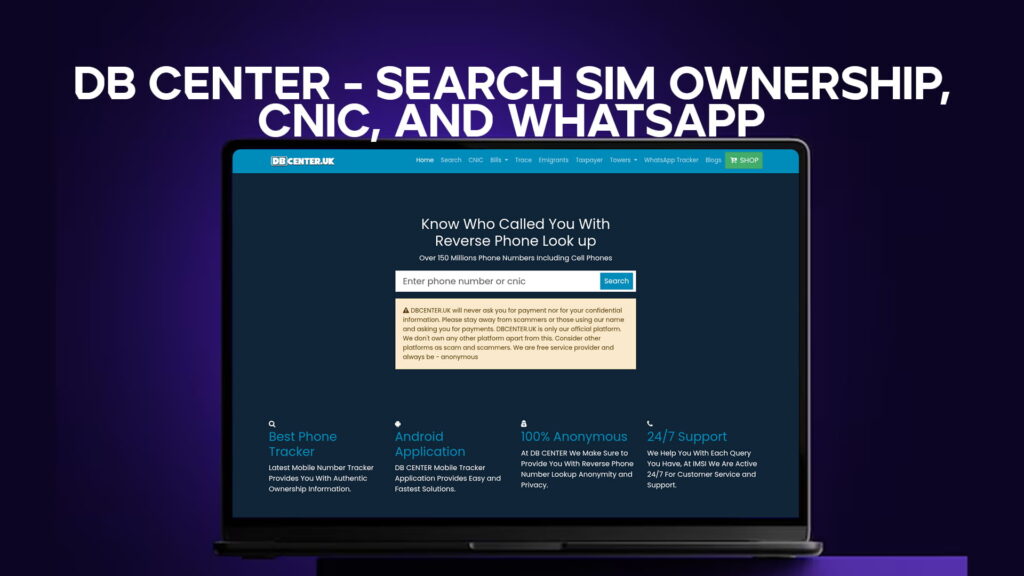
There is a moment most people in Pakistan have experienced at least once. Your phone rings. The number is unknown. You answer, or you do not. Either way, you are left wondering who it was and whether it was important. Maybe you get a WhatsApp message from a number not saved in your contacts. Maybe someone hands you a CNIC copy as part of a business deal and you want to confirm it belongs to who they say it does.
These are everyday situations. And for a long time, there was no simple, reliable way to handle them without either calling back blindly or just letting it go.
DB Center changes that. It is a data lookup platform that lets you search SIM ownership details, check CNIC information, and trace WhatsApp-linked numbers — all from one place. With a database covering over 150 million phone numbers including mobile numbers, it is one of the most comprehensive tools available for people who want to know more before they respond, trust, or transact.
This article covers exactly how each of these features works, why they matter, and how to use DB Center to get the most out of them.
The Problem DB Center Solves
Before getting into the features, it helps to understand the problem that makes a platform like DB Center necessary in the first place.
Pakistan has one of the fastest-growing mobile phone user bases in Asia. There are hundreds of millions of active SIM connections in the country. At the same time, phone-based scams, fraud calls, impersonation attempts, and WhatsApp spam have increased sharply over the past few years. Fraudsters pretend to be bank representatives, NADRA officials, tax authorities, or even family members in emergencies. They use unregistered numbers, recycled SIMs, and WhatsApp accounts with fake profile pictures to appear legitimate.
On the personal side, landlords need to verify tenants. Employers want to check the people they are about to hire. People selling cars, property, or high-value items want to know the buyer is real. Even ordinary individuals want to know who is sending them WhatsApp messages before they reply.
The demand for quick, accessible identity and number verification is real and growing. DB Center exists to meet it.
Feature One: SIM Ownership Search
SIM ownership search is one of the most used features on DB Center. It is straightforward in concept. You enter a phone number, and the platform tells you information about who that SIM is registered to.
This works because of how SIM registration works in Pakistan. The Pakistan Telecommunication Authority mandates that every SIM card sold in the country must be registered against a valid CNIC, with biometric verification taken at the point of sale. No SIM is supposed to be active in Pakistan without being tied to a real identity. This policy was rolled out to reduce crime, terrorism financing, and fraud linked to anonymous mobile numbers.
The result of this policy is a direct, verifiable link between every active SIM card and a registered Pakistani citizen. When you search a number on DB Center, you are tapping into the data layer that this registration system created.
What does the SIM ownership search typically show?
In most cases, you can expect to find the registered name of the SIM owner, the telecom operator the number belongs to (Jazz, Zong, Telenor, Ufone, SCOM, etc.), and the general area or city associated with the registration. In some records, additional details may also appear.
This is genuinely useful. If someone sends you a suspicious message or calls you repeatedly without identifying themselves, a quick SIM ownership search gives you a name to work with. That name alone can tell you a lot — whether it matches what the caller claimed, whether the number belongs to a known business, or whether it is just a personal number with no red flags.
How to Run a SIM Ownership Search on DB Center
Using the SIM search feature is not complicated. Here is the process from start to finish.
Open DB Center on any browser on your phone or computer. No app download is needed and no account registration is required for a basic search. Find the search bar on the homepage and enter the phone number you want to look up. Make sure you enter it in the correct format — in Pakistan, this typically means including the mobile prefix (e.g., 0300, 0321, 0333, 0345, etc.) followed by the seven-digit number.
Once you submit the search, DB Center checks its database and returns whatever information is available for that number. The results come back quickly, usually within seconds.
If you do not get a result on the first try, check the format of the number you entered. Some records in the database are stored with the country code (+92) rather than the leading zero. Switching between formats often resolves a “no result found” response.
Feature Two: CNIC Information Search
The CNIC search is the second major feature DB Center offers. This one is particularly valuable for people dealing with contracts, property transactions, employment checks, or any situation where someone provides a CNIC number and you want to verify it.
Pakistan’s CNIC system, managed by NADRA, assigns every citizen a unique 13-digit number. This number is permanently tied to their registered name, date of birth, gender, and home district. No two people share the same CNIC number. It is the single most reliable identity identifier in the country.
Because SIM cards are registered against CNICs, and because many other records are CNIC-linked, a CNIC search often returns information that extends beyond just the card itself. You may find associated phone numbers, area details, and other data points that help build a picture of the person in question.
DB Center’s CNIC lookup is not a replacement for NADRA’s official verification service. If you need a legally recognized identity check — for a bank, a government office, or a court matter — you should go through NADRA’s own systems. But for everyday situations where you just want to quickly confirm that the CNIC you have been given is real, belongs to the person in front of you, and matches the name they gave you, DB Center is a fast and practical option.
When CNIC Search Is Most Useful
The situations where a CNIC search pays off are more common than people realize.
Hiring domestic staff is one example. Many families in Pakistan hire cooks, drivers, or household helpers. Asking for a CNIC is standard practice, but simply having the card does not tell you much. A quick search confirms the CNIC is genuine and gives you basic background information about the person.
Renting out property is another. Landlords frequently accept CNIC copies from prospective tenants. Checking those details on DB Center before signing a rental agreement adds a layer of security that can prevent serious headaches later.
Buying or selling second-hand goods and vehicles involves high-value exchanges between strangers. A CNIC check takes less than a minute and can confirm the other party is who they say they are.
Business partnerships and freelance work are increasingly common in Pakistan’s growing gig economy. Before entering a financial arrangement with someone you met online or through a referral, verifying their CNIC details through DB Center is a reasonable precaution.
Feature Three: WhatsApp Number Search
WhatsApp has become the primary communication channel for hundreds of millions of people across Pakistan and the wider region. Business deals happen over WhatsApp. Job offers come through WhatsApp. Family groups, work groups, and community networks all run on it. It is not a secondary platform — for most Pakistanis, it is the main one.
And with that comes a new category of problem. WhatsApp messages arrive from numbers you do not recognize. Unknown accounts add you to groups without your consent. Suspicious profiles claim to be from organizations, banks, or authorities. Some are genuinely harmless. Others are not.
The WhatsApp search feature on DB Center helps you figure out which is which.
The connection between WhatsApp and phone numbers is direct. Unlike email or some other platforms, every WhatsApp account is tied to a phone number. You cannot create a WhatsApp account without a valid phone number. In Pakistan, that phone number is a SIM registered to a CNIC. This means the WhatsApp number search follows the same data chain as the SIM ownership search — it just starts from the WhatsApp side.
When you enter a WhatsApp number into DB Center, the platform searches for whatever registration and identity data is linked to that number. If the SIM behind the WhatsApp account is in the database, you will get information about the registered owner. This tells you whether the account is connected to a real registered identity or whether it belongs to a number with no traceable ownership — which itself can be a warning sign.
Practical Uses of WhatsApp Number Search
Think about a few common scenarios where this search adds real value.
You receive a WhatsApp message claiming to be from your bank asking you to verify your account. Before you do anything, you check the number on DB Center. If it comes back as registered to a random individual rather than a verified business, you know immediately not to engage.
Someone you met briefly in a business context keeps messaging you on WhatsApp but never identifies themselves beyond a first name. A quick search tells you the registered name behind the number, which either confirms or contradicts what they told you.
You run a small business and someone contacts you on WhatsApp about a bulk order. Before committing time and resources, you verify the number and confirm you are dealing with a real, identifiable person rather than an anonymous contact with unclear intentions.
A family member receives repeated unwanted messages from an unknown WhatsApp number. Rather than blocking and hoping, you check the number on DB Center to find out who is behind it and decide whether to escalate the matter.
These are not rare edge cases. They are situations that happen to ordinary people every week.
How DB Center Handles Data Privacy
A common and fair question is: if DB Center can look up SIM ownership, CNIC details, and WhatsApp-linked numbers, does that mean your own data is available to anyone who searches for it?
The short answer is that DB Center works with data that is already part of public registration systems. The SIM registration data, for example, exists because of a government-mandated registration policy. The data is not private in the same sense that your medical records or financial statements are private. It is registration data — the kind that organizations, institutions, and regulators already access for verification purposes.
That said, DB Center does not share sensitive financial, legal, or medical information. It does not display full CNIC numbers or complete addresses in a way that would enable targeted harassment. The platform is designed for verification and identification purposes, and the data shown reflects that purpose.
If you are concerned about your own records, you can search your own number on DB Center to see exactly what information appears. This is a reasonable step to take, and it costs you nothing.
Why 150 Million Phone Numbers Matters
The size of DB Center’s database is worth emphasizing because it directly affects how useful the platform is for you.
Pakistan has hundreds of millions of active mobile connections. Many of these belong to the same individuals who hold multiple SIMs — a common practice in Pakistan where people often carry SIMs from different operators to take advantage of different packages. Others belong to businesses, government offices, or registered organizations.
With coverage of over 150 million phone numbers, DB Center includes a large share of the active mobile numbers in Pakistan and the wider region. This means that when you search a number, there is a solid chance it will appear in the results. Platforms with smaller databases frequently return “no result found” for numbers that do exist and are active — just not in their system. DB Center’s database size reduces this frustration significantly.
The database also includes both mobile numbers and landlines in many cases. This is useful when you receive a call from an office line or a number that does not follow a standard mobile prefix pattern.
Comparing DB Center to Other Lookup Options
It is worth briefly comparing DB Center to the other options people in Pakistan commonly use for identity and number verification.
NADRA’s official verification service is the most authoritative option for CNIC verification. It is the right choice for formal, legal, or official purposes. However, it is not designed for casual or quick lookups. The interface is built for institutional users, and access for general public use is more limited.
PTA’s SIM information system lets you check how many SIMs are registered against your own CNIC by sending a message to 668. This is useful for protecting yourself from SIM-based fraud but does not help you look up someone else’s information.
Truecaller is a popular global app that also helps identify unknown callers. It works by crowdsourcing names that users have saved in their contacts. It is useful but limited — it depends on user contributions rather than official registration data, which means gaps are common and names can be inaccurate or misleading.
DB Center sits in a different category. It draws on registered data rather than crowdsourced entries, covers an exceptionally large number of records, and allows CNIC, SIM, and WhatsApp searches from one platform. For Pakistan-specific lookups, it is difficult to find a comparable alternative.
Using DB Center Responsibly
Any tool that gives access to identity-linked information carries a responsibility for how it is used. DB Center is no different.
The platform is built for legitimate purposes: verifying identities, tracing unknown callers, protecting yourself from fraud, and making informed decisions before you trust someone you do not know. These are valid, legal, and practical uses that benefit individuals and businesses alike.
What it is not for is harassment, stalking, unauthorized surveillance, or any other use that causes harm to the people being looked up. Misusing identity data in Pakistan can carry legal consequences under the Prevention of Electronic Crimes Act (PECA) and other relevant laws. If you use DB Center’s tools to harm someone — sending threats, enabling fraud, or facilitating any illegal activity — that responsibility lies entirely with you, not with the platform.
For the vast majority of users who come to DB Center with straightforward and honest needs, none of this is a concern. It is simply worth stating clearly.
Getting Started Today
If you have never used DB Center before, starting is easy. There is no registration required. No lengthy form to fill in. No subscription to set up before you can run your first search.
Go to DB Center, enter the number or details you want to look up, and see what comes back. The results speak for themselves. Whether you are trying to identify an unknown WhatsApp contact, verify a CNIC for a business deal, or simply find out who owns the number that called you twice this week, DB Center gives you a fast and reliable answer.
For anyone who regularly deals with new contacts, manages transactions with strangers, or simply wants to feel more informed about who they are communicating with, DB Center is a tool worth bookmarking.
You can search any Pakistani mobile number on DB Center to find SIM ownership details. Since PTA requires all SIMs to be registered against a valid CNIC with biometric verification, most active numbers are traceable to a registered name and operator.
Yes. Every WhatsApp account is linked to a phone number, and in Pakistan that number is registered to a CNIC. Searching the WhatsApp number on DB Center follows the same data trail as a SIM ownership search and can return the registered owner’s details if the record exists in the database.
PTA allows a maximum of five SIMs per CNIC across all networks. You can check how many SIMs are currently registered against your own CNIC by sending your CNIC number to 668 via SMS. If you find numbers you did not register, report them to PTA immediately.
Yes. DB Center maintains and updates its database of over 150 million phone numbers to keep records as accurate and current as possible. However, for official or legal verification needs, always confirm findings through NADRA or PTA’s official channels.
Search the number on DB Center first to identify who is behind it. If the contact is unwanted or threatening, block the number on WhatsApp, report it directly within the app, and if necessary file a complaint with FIA’s Cybercrime Wing at nr3c.gov.pk.
Conclusion
SIM ownership search, CNIC information lookup, and WhatsApp number tracing — three features that cover the most common identity verification needs in Pakistan today. DB Center brings all three together in one clean, easy-to-use platform backed by a database of over 150 million phone numbers.
The situations where these searches come in handy are not rare or extreme. They are ordinary parts of life in Pakistan: hiring staff, renting property, closing business deals, identifying unknown callers, and staying safe from phone and WhatsApp-based fraud. DB Center is built for exactly these moments — quick, reliable, and accessible to everyone without technical knowledge or prior experience.
In a country where identity fraud and unknown caller scams are real daily concerns, having a tool like DB Center in your corner is not just convenient. It is practical protection.